

IMPORTANT NOTE: Yes, I’m aware that some users have issues with not being able to swap between mobile and desktop themes. There are a few reasons that this can happen, so please try these steps before leaving comments about it:
- Clear your cache if possible. You might have the wrong version of the site cached, and your brower is simply serving you the old cached version.
- Turn off any ad blocking extensions that you might use. I’m not entirely sure why this works – my theory is that the adblock extention somehow is blocking the script that swaps between the themes – but I’ve had people say that doing this solved their issue.
- If neither of those work, please leave a comment with your user agent. This website uses a caching module to cut down on resource usage. For mobile browsers, I have to manually block those user agents from being served a cached version of the web page. So for example, if you’re on a phone but it’s not a user agent that has a caching exception, the site may try to continually serve you the same version of the index because that’s the version the site cached last. The cache is automatically renewed every so often, so this is why sometimes the problem seems to solve itself. Leaving a comment with your user agent will allow me to ensure that your mobile device is exempt from being served a cached page; and if the error persists even with your user agent as an exception, I can report this error to the mobile plugin developers. If you need help figuring it out, please visit What’s My User Agent and copy/paste the results.
Anyhow, on to the original post:
A few of you have sent me emails wanting me to make a less data-heavy, more streamlined version of the site for people browsing by phone, since the normal site can be a bit unwieldy and costly for mobile users to browse.
If you’re a mobile reader, you should already have noticed that this has been done! Now, for both creepypasta and crappypasta, the site should auto-detect that you’re on a phone and give you portable version of the site.
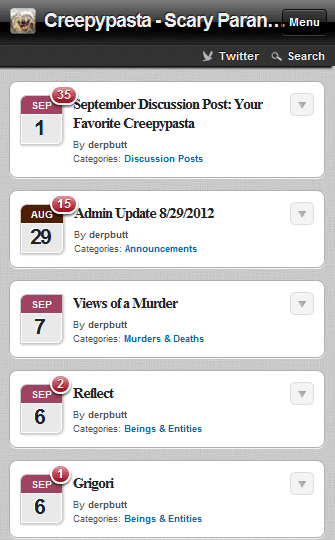
If you don’t like it (or if you’re one of those unlucky people whose browser likes to randomly show you mobile versions of sites for some reason), just scroll down to the bottom. You should see this:
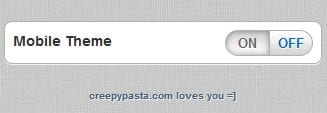
As you can probably surmise, hitting the ‘off’ button will magically transport you back to the original version of the site that you all know and (hopefully) love. No need to freak out or leave panicked comments, it’s okay! You can get back to normal with the click of a button.
Now, for mobile site navigation, it’s pretty simple. Hit ‘Menu’ and you can easily access all the pages, tags, and categories that you’re used to. Unfortunately, plugins like popular posts, random posts, recent comments, etc can not be accessed via the mobile theme at this point. Sorry.
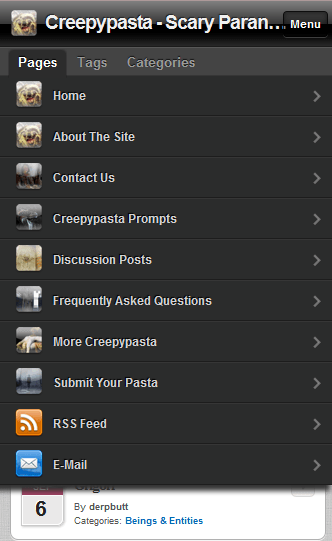
That’s about it. I just wanted to announce this so that you guys know that I *do* listen to your feedback (and also to calm some of you who are getting the mobile theme and freaking out about the ‘new creepypasta’). Now, I don’t actually have any sort of decent phone for web-browsing myself, so I’m having to rely on previewing this through developer tools in Safari. If you find that anything is ridiculously broken, please do let me know.
And please don’t neglect the original theme when you’re browsing on PC. Even if you don’t click anything or buy anything through our affiliates, those ads are what pay the hosting bills! Without them, there would not be a site. That’s the sad truth of the internet.
Copyright Statement: Unless explicitly stated, all stories published on Creepypasta.com are the property of (and under copyright to) their respective authors, and may not be narrated or performed under any circumstance.
I’m just getting into the site more and suddenly, all I’m getting is the mobile version no matter what I do. I have completely cleared all stored information and is still happening, came across this post while troubleshooting, hope you can help.
I can’t really use the mobile version. It used to run just fine on my sony Xperia (android system: honeycomb os). Now, the first page loads up, and if I don’t click on something QUICK it will turn into a blank white screen. Not sure why it does that. It’s also a lot harder to navigate than before. I can’t scroll side to side, so the only catagories I have access to are the first 3.
Thanks, I’ll open a ticket with the mobile plugin people and include this report! They’ve been updating/adding new features lately, and a few bugs have come along for the ride, it seems.
It’s funny, this page shows up in mobile, but when I go back to the rest of the site it’s on the desktop. Instead of using an autodetect script, make a manual way of switching
TL;DR YOUR SCRIPT IS BROKEN
The version you’re served is dependent on your user agent. Speaking of, care to volunteer that information? Useful details are nice when leaving complaints or bug reports.
As for what you’ve said, I’ve asked for this function but apparently it’s not on the table. If you’re on one of the listed user agents, you are shown the mobile theme and there should be a mobile on/off link on the bottom of all pages. For whatever reason, we cannot just add a ‘switch to mobile’ button on the desktop theme. I suppose I can keep asking and hope that they break down and give in eventually.
I’m using safari in iphone 4 and it’s been unable to go to mobile site for couple of months, suddenly one day it just changed to normal site… i don’t know why, i even opened it from the ‘app’. No pop up blocker, cleared all data and history. What should i do? Maybe you can put a link that will change the plugin(or script something? Sorry i’m not familiar with this stuff) to change the page back to mobile? Thank you
I’m using iphone and it’s been unable to go to mobile site for couple of months, suddenly one day it just changed to normal site… i don’t know why, i even opened it from the ‘app’. No pop up blocker, cleared all data and hist
I’ve been having an issue on my Desktop with some pages loading into iPad theme and getting stuck there. I have tried clearing my cache and I do not use any ad blocking addons. My current browser is Firefox.
hey derpbutt. I can’t switch themes either. I try after clearing the cache but it doesn’t work. it just doesn’t switch. btw my phone is a Galaxy S3 using Firefox 21.0 . Also I’m not fond of red on grey. hard to read. keep up the amazing work though love it otherwise
hey derpbutt. I can’t switch themes either. I try after clearing the cache but it doesn’t work. it just doesn’t switch. btw my phone is a Galaxy S3 using Firefox 21.0 . Also I’m not fond of red on grey. hard to read. keep up the amazing work though love it otherwise! -Sym
I’m on my laptop and the front page is on mobile, and I tried changing it to “off” but all it does is refreshes and stays as Mobile, no matter how I change it. But when I go on a different link, that isn’t on the front page, it shows a normal computer layout. It’s all quite irritating. I just wanna see the front page normally, ugh.
Also, idk if this will help any, but I have Ad Blocker, so maybe that’s something to do with it? I dunno.
I fixed it! What I did was go to my Ad Blocking, and clicked “Don’t Run On this Page”, and it automatically fixed it! Not sure if it’ll work for everyone else, but just a suggestion. It did it for me:)
I’ll tell people to try this, thanks. It’s possible that Adblock is somehow blocking the script to change between the site versions.
It’s a caching issue. I’m going to edit this post/the FAQ to explain it.
I have to say the mobile theme is working for me sometimes but sometimes not I got to creepypasta.com it doesn’t do the mobile theme and I’m using a blackberry if its not the theme it won’t let me load it because its to big ….. :/
It has to do with caching. If you can tell me your specific user agent, I can add it to the exception list so that it should (theoretically) skip the cache and load the proper version.
It’s an annoying issue with our caching plugin (which is very necessary, given that without it our resource usage explodes and the site becomes incredibly slow): if it has the desktop version cached for mobile users, it will deliver that to all mobile users until the cache auto refreshes. That’s why sometimes you can’t switch between versions and sometimes you can, and sometimes you get the wrong version over and over.
The authors of both plugins are supposedly working on it, but it’s still a widespread issue.
Hey, is there any ways to fix this? Im on desktop but its not going off the mobile version, what it does is it says “IPAD theme” instead, and i hit the OFF button but it just takes me to the top of mobile theme. help? :(
I’m trying to view this website in normal mode from my computer but the website is stuck in ipad mode. No, the button at the bottom doesn’t change it.
If its any help I’am using the standard using the app page thing but on both safari and the app page thing if messes up a bit but thanks again and I can catch up and crap myself when I get home.
And I have a question and its kinda long, lately I’ve been a bit worried over things small stuff but something weird happened i read and have been hearing of people being able to inherit souls (like spirit of death or war or the dragon and so fourth) but as a consequence anyone who gets a soul seams to have the same “obstacles ” in there way one of them for the spirit of death is that you will be busted by a man who will kill your family and lived ones and leave you in pain then inform you of deaths soul what sort of frightens me (as much as I hate my family ) all the traits of a person having the spirit of death I can find in myself I’am not sure if this is true but if anyone knows I would love too hear.
Again thanks derpbutt
Apologies, but I found this comment really hard to parse. I’m not sure what you’re telling/asking me?
Sorry nevermind
you already know my first comment. one more thing, the red text on gray kills my eyes. im already blind man, this is too much though. but i will add, i do love the rest of it. i would also say, add a link or section in the drop down menu to browse random pastas there. other than that flawless.
Thanks derpbutt,
But there’s a problem after using this for a couple of days it started messing up everytine I change category like from “beings and entites” to like “objects and artifacts” it turn into the pc version there is no problem (don’t worry yourself I’am probably just ballsing up again) but if its a common problem please fix it. Thank you keep up the amazing work and more true story’s like the “this man” post please.
I’ll pass this on to the developer of the plugin I’m using to handle the mobile theme, however there may not be much I can do personally until they respond. What user agent or type of phone browser are you using. if you don’t mind my asking?
I’ll work on some more true story posts, glad to know people like them!
I have no clue why. But now when I read a story on my pc of the home area it sends me to the mobile theme. I then can’t switch to pc because the button just refreshes the page still on mobile.
I know this post is months old, but I have no clue how I should submit this issue. Oh well.
Just to clarify, when you hit the button at the bottom of the mobile theme, it still shows you the mobile theme?
Yes. It reloads the page, but the mobile theme is still on, And the button shows it as on. The moment I press the button it turns shows “off”, but the page just resets and the mobile theme is still there. And the button is back on.(Okay I wrote that rather poorly)
I have to say though. The whole thing has gotten stranger. Now it is no longer doing this. I tried about four or five stories that day, and all did that. Today I am browsing stories with no problem.(To clarify ‘no problem’ I mean it does not even start me on mobile theme in the first place. Which is good.)
Well… huh. I’m glad it fixed itself?
This has actually happened to me a couple of times too, but the button worked fine for me.
How do I get back to mobile theme?!
Only note I would like to add is that it would be cool if we could see the rating for the pasta before having to click on it. Other than that I love the mobile site, keep up the good work!!!
There is SUPPOSED to be a way to switch back to the mobile theme in the footer, but I’m not seeing it either on Safari iPhone developer.
I’ve tried to contact the people who run the plugin that I’m using, but so far no response. I’m not paying for their “pro” version so helping me is probably not at the top of their to-do list (and before you guys get on my case for not paying for the better version, I simply don’t have the money for it, sorry). The fact that I’m using the free version is also why I can’t add any of the plugins from the desktop version (ie Popular/Random Posts) – I can’t mess with the mobile theme at all beyond what you’ve seen already. Same goes for messing with the comments, I don’t have any options to change those settings.
So for now, I guess just stop switching to desktop on your mobile if you don’t want the desktop theme?
Also, are you able to clear your cache on mobile browsers? In the Safari iPhone thing, I can do that and it will take me back to the mobile version once I reload the site. But like I said, I don’t have an actual mobile browser to test it on so I don’t know if that’s something you guys can actually do.
I can’t switch back to mobile theme now
How do i go back to the mobile theme from the normal one? I changed it from te mobile version to the normal one and i don’t know how to change back? Please help
Ive been creepypastas for a while and I mainly use my iphone and I am so happy you added the mobile site. But there are many bugs and glitches and some questions I have.
First off when are you going to add popular and random posts? That was a great feature of creepypasta.
Second About the crashing, when you load the comments depending on how many there are it will try to load all of them at once and crashes the browser. Most mobile browsers and apps load only so many at a time just so this doesnt happen. Even with 61 comments my phone cant handle not to mention trying to load candle coves comments.
And last, about the color scheme. I think its fine. Yes dark adds a somewhat more creepyness but this works just fine an makes it easier to read. If you want scary go listin to mrcreepypasta or even worse watch marble hornets entry ####. Thats the scariest video on the internet. I would not suggest watching it alone at night.
And a suggestion is try to add more to the menu but I like the mobile its very user friendly
Thank you for the updates and all you do to keep the creepyness coming!
I fixed the problem with the color scheme
Make sure your iOS Device is set to triple-tap to invert colors. Lololol
True story
love this mobile update, great job (:
In the words of Spongebob Squarepants…
“It’s the best day ever!”
I just say change the color scheme… I like it darker not bright. That’s all. Until then I’m sticking with the old theme
notes from someone who spent 24 hours on mobile :
when you click on a pasta, read it, then click back, it starts you at the top of the page, making you scroll through everything you just read to get to where you want to be. i don’t understand making web sites, but if some sort of place holder could be implicated, that’d be nice.
also, it crashes once every few hours. which is creepy scary. reading a story, then the screen goes black. the first few times it happened i shat brix. I’m currently building a house
thank you creepy pasta
doesm’t work on my PSP if that counts as a problem.
Thanks for the mobile site! Works great on my phone which is what I’ve always read creepypasta on so I was super thrilled with the mobile version when I got on today!
In regards to the color scheme… I can’t really win. People send me emails telling me how much the darker scheme sucks all the time, too. I can’t do anything right, I get it =P
Merrell – It should be auto-recognizing Blackberry phones. There’s no link to a mobile site, because it’s a theme/plugin doing the heavy lifting here and not an actual duplicate site (duplicate content tends to make Google sad, so I’m trying to avoid that). But Blackberry user agents ARE supported, so I’m not really sure what to do for you, I’m sorry! Is there a cache that you might need to clear?
apocalipserider – Um, considering that you gave me ZERO information to work with, I’m not sure how you expect me to help you. Maybe you could start by telling me what kind of phone you’re having problems accessing the site on?
Remember that some of you might have issues connected to your phone settings, which I can’t really do much about. If you tell me the exact phone/user agent you’re using and have ensured that it’s not just your settings causing problems, leave a comment with the user agent and I’ll make sure it’s added to the list of agents the plugin recognizes and redirects to the mobile version.
Beyond that, give me some time to look into this. I’m not familiar with mobile browsing, so this is kind of a steep learning curve for me here. Please be patient/understanding, thanks.
Your mobile site sucks balls!
THE WHO WAS TESTICLES?!
LOVE THIS
My only complaint is the change in color scheme
But it’s a pretty minor complaint.
It doesn’t works on my phone. It’s still displaying the original theme. Please do something about it.
On my blackberry it does not and has never showed a mobile theme. I don’t know if it’s even possible on blackberry, because it’s such a crappy phone, but could anyone past the link to the mobile site?
Thank you!
The mobile sites are awesome. I was pleasantly surprised when I saw it.
I cant thank you enough for the mobile phone version mate. This is grate. I know have a travel stove for pasta on the go.
Nice one.
Wow, i’m highly impressed! Great job! :D